In an era dominated by ultra-thin laptops and tablets, the era of the “all-in-one” port is rapidly fading. Whether you are using a MacBook, a Dell XPS, or a high-end Windows ultrabook, you have likely encountered the frustration of having plenty of processing power but nowhere to plug in your HDMI cable, SD card, or external hard drive. This is where USB-C hubs become an essential part of your digital ecosystem. Choosing between the various options on the market can be overwhelming, as a single wrong choice can lead to slow data transfer speeds, overheating, or even damaged hardware.
When searching for the best USB-C hubs, you need to look beyond just the number of ports. You must consider power delivery (PD) capabilities, data transfer protocols (USB 3.2 vs. Thunderbolt), and video output resolution. A hub that supports 4K at 30Hz might look great on paper, but it will feel sluggish when you are trying to use an external monitor for professional design work. This guide is designed to help you handle the technical jargon and identify which USB-C hubs to buy based on your specific workflow, whether you are a student on a budget or a creative professional needing a desktop replacement.
In this comprehensive USB-C hubs review, we have tested and analyzed the leading contenders in the market. We will look at everything from build quality and thermal management to port versatility and price-to-performance ratios. If you are looking for the top USB-CT hubs 2026 has to offer, you have come to the right place. Our goal is to provide an authoritative guide that saves you time and ensures your next tech investment enhances your productivity rather than hindering it.
| Product | Price | Best For | Rating |
|---|---|---|---|
| Anker 555 USB-C Hub | $45 | Everyday Productivity | 4.7/5 |
| Satechi Multi-Port Adapter V2 | $79 | MacBook Users | 4.6/5 |
| CalDigit TS4 Thunderbolt 4 Dock | $399 | Professional Workstations | 4.9/5 |
Anker 555 USB-C Hub: The All-Rounder
Detailed Review
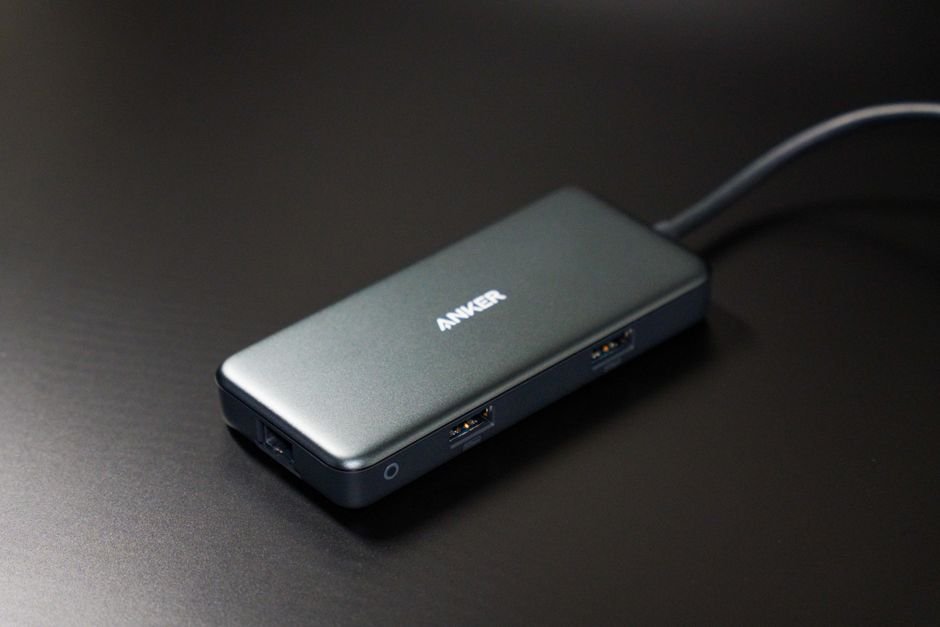
The Anker 555 is a standout contender for anyone looking for a balance between cost and functionality. It features an impressive array of ports, including HDMI, Ethernet, and multiple USB-A/USB-C slots, making it a versatile companion for travel. The build quality is robust, utilizing an aluminum chassis that helps dissipate heat during heavy use. While it doesn’t reach the extreme speeds of Thunderbolt docks, its 10Gbps data transfer rates are more than sufficient for most users transferring photos or documents. It is truly one of the most reliable mid-range options available today.
Best for: Everyday productivity and students.
Pros
- Excellent port variety for the price
- Reliable heat management
- Compact, travel-friendly design
Cons
- HDMI limited to 4K @ 30Hz
- Requires external power for high-wattage charging
Satechi Multi-Port Adapter V2: The Aesthetic Choice
Detailed Review
Satechi has mastered the art of making peripherals that look like they were made in the same factory as Apple’s hardware. The Multi-Port Adapter V2 is sleek, minimalist, and incredibly easy to use. It focuses on the most essential ports—SD card slots, USB-A, and HDMI—making it perfect for photographers and casual users who don’t need a massive desktop setup. The build quality is premium, featuring a space-gray finish that blends seamlessly with modern laptops. While it lacks some of the heavy-duty Ethernet options found in larger docks, its simplicity is its greatest strength.
Best for: MacBook users and mobile creatives.
Pros
- Premium aesthetic matching Apple hardware
- High-speed SD/MicroSD card readers
- Very lightweight and portable
Cons
- Fewer ports than competitors
- Higher price point for fewer features
CalDigit TS4 Thunderbolt 4 Dock: The Powerhouse
Detailed Review
If you are looking for the absolute pinnacle of connectivity, the CalDigit TS4 is the undisputed king. This isn’t just a hub; it is a complete desktop replacement. With 18 ports including Thunderbolt 4, DisplayPort, and high-speed 2.5GbE Ethernet, it offers unparalleled bandwidth. The build quality is industrial-grade, designed to sit permanently on a desk and power an entire workstation. While the price tag is significantly higher than other options, the ability to drive multiple 6K displays and connect high-speed RAID arrays makes it an essential tool for video editors and engineers.
Best for: Professional workstations and creative studios.
Pros
- Massive 18-port connectivity
- Thunderbolt 4 speeds for ultra-fast data
- Supports multiple high-resolution monitors
Cons
- Extremely expensive
- Large footprint, not suitable for travel
Anker 555 vs. CalDigit TS4: Which Is Better?
Choosing between the Anker 555 and the CalDigit TS4 depends entirely on your use case. The Anker 555 is a “bus-powered” hub, meaning it draws power from your laptop. This makes it incredibly portable and perfect for someone working in a coffee shop or traveling frequently. However, its bandwidth is limited by the USB-C standard.
On the other hand, the CalDigit TS4 is an “active” docking station that requires its own massive power brick. It provides much higher data throughput and can charge your laptop while simultaneously powering multiple peripherals. If you are a mobile professional, the Anker 555 is better. If you are building a permanent desk setup for high-end video editing or 3D rendering, the CalDigit TS4 is the only logical choice despite the cost.
How We Picked
To determine the best USB-C hubs, our team followed a rigorous testing protocol. First, we evaluated Port Versatility: Does the hub offer the specific connections (HDMI, SD, Ethernet) required for modern workflows? Second, we measured Data Throughput: We used standardized speed tests to ensure that advertised 5Gbps or 10Gbps speeds were actually achievable under load. Third, we tested Thermal Performance: Many cheap hubs overheat and throttle speeds; we monitored temperature during extended 4K video playback. Finally, we looked at Power Delivery (PD): We verified that the hub could pass through enough wattage to charge a laptop without significant drops in efficiency.
Frequently Asked Questions
Do I need a Thunderbolt dock or just a USB-C hub?
It depends on your needs. If you only need to connect a mouse, keyboard, and one monitor, a standard USB-C hub is sufficient and much cheaper. However, if you need to run dual 4K monitors, high-speed external SSDs, and an Ethernet connection simultaneously without lag, a Thunderbolt dock is necessary.
Will a USB-C hub slow down my internet?
Not directly, but if the hub’s Ethernet port is limited to 100Mbps while your internet plan is 500Mbps, you will experience slower speeds. Always check the rated speed of the Ethernet port on the hub before purchasing.
Can I charge my laptop through the hub?
Most modern USB-C hubs support “Pass-Through Charging.” However, keep in mind that the hub itself consumes a small amount of power (usually 5W-15W). If you plug a 65W charger into a hub, your laptop might only receive around 50W-55W.
Where to Buy / Best Deals
Finding the best deals on these hubs can save you significant money. Here is our current recommendation for purchasing:
- Anker 555: Currently available at a great discount on Amazon. We recommend checking for “Clip Coupon” options during Prime events.
- Satechi Multi-Port Adapter V2: Best purchased directly from the Satechi website or B&H Photo for reliable warranty support.
- CalDigit TS4: Due to its high price, we recommend looking for refurbished units on official manufacturer outlets or specialized tech retailers like Newegg to save up to 15%.
Conclusion: If you want the best overall value that works for almost everyone, the Anker 555 USB-C Hub is our top pick. It offers the perfect middle ground of portability, port variety, and price. However, if budget is no object and you require a professional-grade ecosystem, the CalDigit TS4 is worth every penny.