Why Start Small? The Mindset of a Smart Home
Welcome to the exciting world of home automation! If you have been reading about smart homes for years but still feel overwhelmed by the sheer number of devices, hubs, and ecosystems, you are not alone. The biggest mistake beginners make is trying to automate their entire house on day one. That approach often leads to frustration, broken setups, and a lack of motivation to keep going. Instead, we advocate for a “start small” philosophy. By focusing on just a few high-impact devices that solve immediate problems, you can build a foundation that grows naturally over time.
The goal isn’t to have every light bulb connected immediately; it is to experience the convenience of a truly smart home. Whether you want to control your lights from your couch or receive an alert when someone enters your backyard, the journey begins with a single purchase. This guide will walk you through exactly what you need to kickstart your automation journey without breaking the bank or getting lost in technical jargon.
Selecting the Right Central Hub
The heart of any smart home is its central hub or controller. While many modern devices are “hub-less” and connect directly to Wi-Fi, relying solely on that can make your system fragile. If your internet goes down or a router update resets IP addresses, you could lose control of all your lights instantly. A dedicated hub provides a stable, local connection that ensures your home works even when the internet is spotty.
When choosing a hub, compatibility is king. You must decide which ecosystem aligns with your existing devices and future plans. Apple HomeKit offers incredible privacy and ease of use if you are in the Apple ecosystem, but it often requires third-party hubs like the Eve Hub or Amazon Echo for advanced automation. On the other hand, Google Home and Amazon Alexa offer vast marketplaces with devices from almost every brand, making them ideal for beginners who want variety. Samsung SmartThings is another excellent option that acts as a universal translator, allowing you to mix and match devices from different brands under one app.
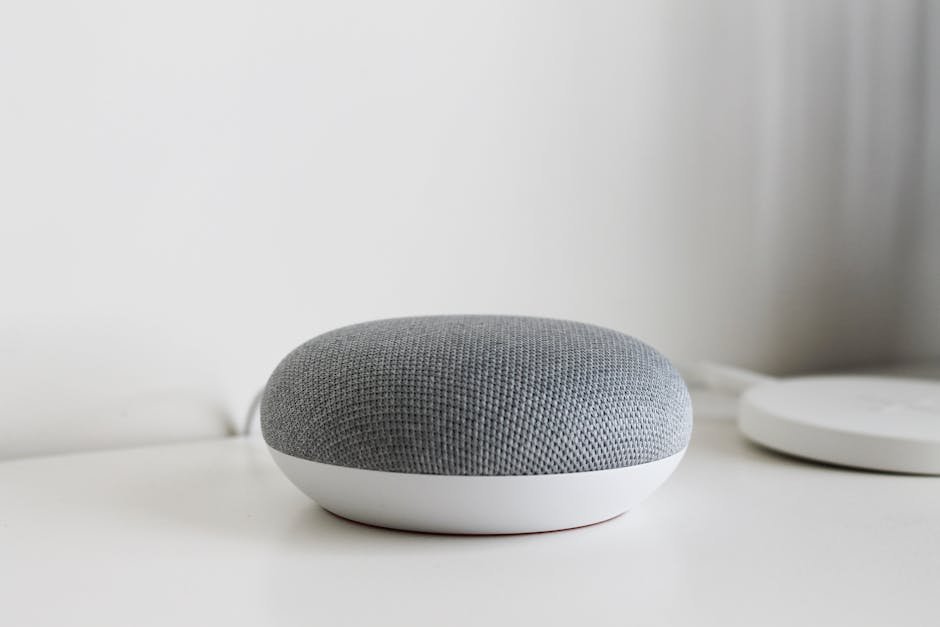
For most users starting out, we recommend picking a hub based on the smartphone you use daily. If you live entirely in an iPhone world, a HomeKit-compatible hub is a safe bet. If you are more flexible or own Android devices, the Google Nest Hub or Amazon Echo Dot (4th generation or later) serves as both a speaker and a robust control center. Remember, this is your command center; invest in quality here so your other devices can shine.
Lighting: The Most Accessible Entry Point
If there is one category where you should start, it is lighting. Smart bulbs are arguably the most user-friendly entry point into home automation. Unlike smart switches that require complex wiring changes during installation, smart plugs and bulbs are “dumb” devices that turn into “smart” ones simply by plugging them in or screwing them into a socket. This makes them perfect for renters who cannot modify their electrical panels.
When shopping for your first few lights, look for compatibility with the hub you chose earlier. Brands like Philips Hue are famous for their color accuracy and reliability but come at a premium price. However, they work flawlessly with almost any hub. For budget-conscious starters, companies like Kasa (TP-Link), Govee, or Nanoleaf offer fantastic alternatives that provide similar functionality—dimming, scheduling, and voice control—at a fraction of the cost. Silicon Valley Smart Bulbs are another great option for those who want sleek design without the Hue price tag.
We suggest starting with three to five bulbs in your main living areas: the kitchen, living room, and perhaps one bedroom. Set up a simple routine where these lights turn on when you walk in at night or dim automatically when the sun sets. This single action can transform your daily experience, creating ambiance with the tap of an app or a voice command. As you get comfortable, you can expand this network to include smart switches for ceiling fixtures, which offer a cleaner look by hiding the bulbs entirely.
Security and Monitoring: Eyes on Your Home
The second most impactful area to automate is security. You do not need expensive professional monitoring systems to start securing your home; consumer-grade smart devices are incredibly effective and easy to install. The first piece of equipment you should consider is a smart video doorbell. Devices like the Ring Video Doorbell, Nest Hello, or Arlo Ultra provide crystal-clear video feeds directly to your phone whenever someone approaches your front door.
Installation is remarkably simple for these units. Most come with an existing battery pack that allows you to mount the device immediately without running new wires. If you already have a wired doorbell system, you can often bridge the connection using adapters. Beyond the doorbell, consider adding smart indoor cameras or outdoor security cameras with night vision. Look for devices that support local storage, such as SD card slots or integration with local network recording, to ensure your footage is safe even if cloud services go offline.
Do not overlook smart locks either. Upgrading from a traditional key lock to a smart lock like the August Wi-Fi Smart Lock or Yale Assure gives you total control over who enters your home. You can grant temporary access codes to guests, cleaners, or babysitters and revoke them instantly once their visit is over. These locks often integrate with your existing doorbell, so if someone rings the bell, your phone alerts you, and you can unlock the door remotely before they even knock.
Actionable Tips for a Smooth Setup
To ensure your smart home journey remains smooth and enjoyable, keep these practical tips in mind. First, naming convention is crucial. Do not name your lights “Living Room Light 1” and “Living Room Light 2.” Instead, name them functionally, such as “Kitchen Task Lighting” or “Bedroom Nightlight.” This makes setting up automation scenes much easier later on; imagine telling Alexa to turn off the “Nightlights” instead of searching for specific devices.
Second, prioritize privacy and security. Always change the default passwords on your new devices immediately. Enable two-factor authentication (2FA) on your main hub account if available. Be mindful of which cameras have microphones; while many claim to only record when motion is detected, it is good practice to review their data policies. Finally, be patient with the learning curve. The first time you set up a device might take twenty minutes of troubleshooting Wi-Fi connections. This is normal. Take a screenshot of your app settings before restarting your router, and don’t hesitate to consult community forums if you get stuck.
Start with one hub, three smart bulbs, and a doorbell. Test these devices for a week. See how they fit into your routine. Once you are comfortable, add a smart thermostat to manage energy costs or a smart plug for your coffee maker. The beauty of this approach is that you are building a system that evolves with you, rather than trying to force a perfect system before you understand your needs.
Conclusion: Your Journey Begins Today
Building a smart home is not about having the most expensive gadgets; it is about solving real problems and adding layers of convenience to your daily life. By starting with a reliable hub, upgrading your lighting, and securing your entry points, you lay a solid groundwork that can expand indefinitely. Remember that every expert was once a beginner who bought their first smart bulb. Take that first step today, enjoy the immediate benefits of remote control and automation, and let your home grow smarter at your own pace. Happy automating!